How to Make and Add Stickers in GBWhatsApp?
Stickers make chatting more expressive and fun — and if you're using GBWhatsApp, you already know how much more freedom it offers compared to the official WhatsApp. While the standard app limits your sticker use to pre-made packs, GBWhatsApp lets you create, customize, and add your own stickers with just a few simple steps.
Whether you want to share memes, personal photos, or branded stickers for your channel, this guide shows you exactly how to make and add stickers in GBWhatsApp like a pro.
Learn about Stickers in GBWhatsApp
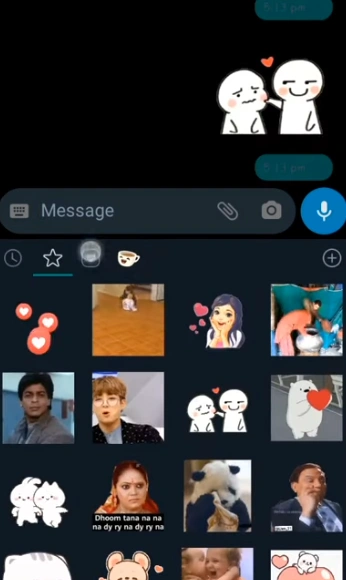
In GBWhatsApp, stickers are not just add-ons — they're a built-in way to express emotion, humor, and creativity.Unlike plain text, stickers let you express what words cannot — the laugh you can't type, the wink you can't say, or the quick reaction that speaks louder than a full sentence. They add a visual rhythm to your chats, making conversations feel alive and more natural.
Like in regular WhatsApp, you can send sticker packs in chats, but GBWhatsApp gives you far more freedom: custom uploads, animated stickers, and support for third-party creators. You're not limited to the default collection — you can turn your favorite memes, selfies, or even brand logos into expressive chat stickers that truly reflect your personality. It's a creative layer that makes your messages not just seen, but felt.
Why Custom Stickers Make Chats Better?
A simple sticker can say more than a paragraph of text — that's why GBWhatsApp users love them. With the app's extended customization tools, stickers make conversations faster, more personal, and more fun.
- They add emotion to your chats when words fall short.
- They strengthen personal connection — perfect for friends, fan groups, or small businesses.
- They make your channel updates more engaging, especially when paired with creative visuals.
- And most importantly, they reflect your unique personality, not just generic emoji reactions.
GBWhatsApp turns simple communication into a creative experience, where every message feels more alive.
What You Need Before Creating Stickers?
Before you start designing, make sure you've got the basics ready:
- Download the latest version of GBWhatsApp.If you haven't yet, complete your GBWhatsApp download from a trusted source before creating stickers.
- A sticker maker app (such as "Sticker Maker," "Personal Stickers for WhatsApp," or "Wemoji").
- Images or PNGs with transparent backgrounds — this makes your stickers look clean.
- Enough storage space to save new sticker packs.
Once these are set, you're ready to bring your creativity into your chats.
How to Make Your Own Stickers?
Creating stickers is easy and doesn't require design skills. Here's how to do it using a sticker maker app:
- Open your chosen sticker app and tap Create New Pack.
- Add 3 or more images — either from your gallery or freshly taken photos.
- Use the crop or remove background tools to isolate faces or objects.
- Add text or emojis if you'd like to personalize your stickers.
- Once done, tap Add to WhatsApp (the app automatically integrates with GBWhatsApp).
Your stickers are now ready to use — open any chat, tap the emoji icon, then the sticker tab, and send them instantly.
Adding Custom Sticker Packs to GBWhatsApp
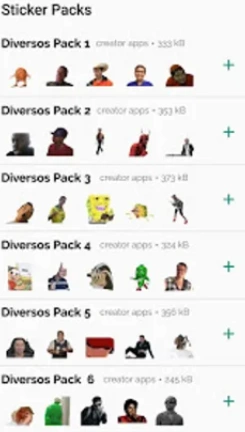
GBWhatsApp also supports external sticker packs, allowing you to import designs shared by friends or downloaded from the web. To add them, simply download a sticker pack file — usually in .webp or .zip format — and extract it using your phone's file manager. Once extracted, open your sticker app and tap "Add to WhatsApp" or "Import Pack." The new stickers will automatically sync with GBWhatsApp, ready for you to use in any chat.
You can repeat this process anytime to expand your collection with creative memes, favorite quotes, or seasonal packs that match your mood. It's an easy way to keep your GBWhatsApp stickers fresh and personal.
Tips for Managing Stickers Like a Pro
Too many stickers can make your app cluttered. Here's how to keep things organized:
- Delete unused packs from the sticker section to save space.
- Group stickers by theme — funny, reaction, daily use, etc.
- Regularly back up your stickers if you switch devices or reinstall GBWhatsApp.
Keeping your collection tidy ensures faster loading and smoother chatting.
Bring Your Chats to Life with Custom GBWhatsApp Stickers
Stickers make every conversation brighter — and with GBWhatsApp, you have full creative control. From designing your own to importing packs that match your vibe, everything is simple and flexible.
Just like GBWhatsApp themes, custom stickers let you personalize every corner of your chat experience — turning ordinary messages into something that truly reflects your style. Start experimenting with your favorite images today and see how easy it is to give your chats a personal touch. Once you try it, you'll never go back to plain emojis again.